SoleGym

The solo lifter's ledger

Train alone.
Miss nothing.

You log the set. SoleGym runs the rest timer, reads the session lift by lift, and decides what the bar carries next time — then plans the block that gets you there. It never asks who you are, and it can't reach the internet.

  • Android 8.0+
  • No account
  • No network permission
  • No ads, no analytics
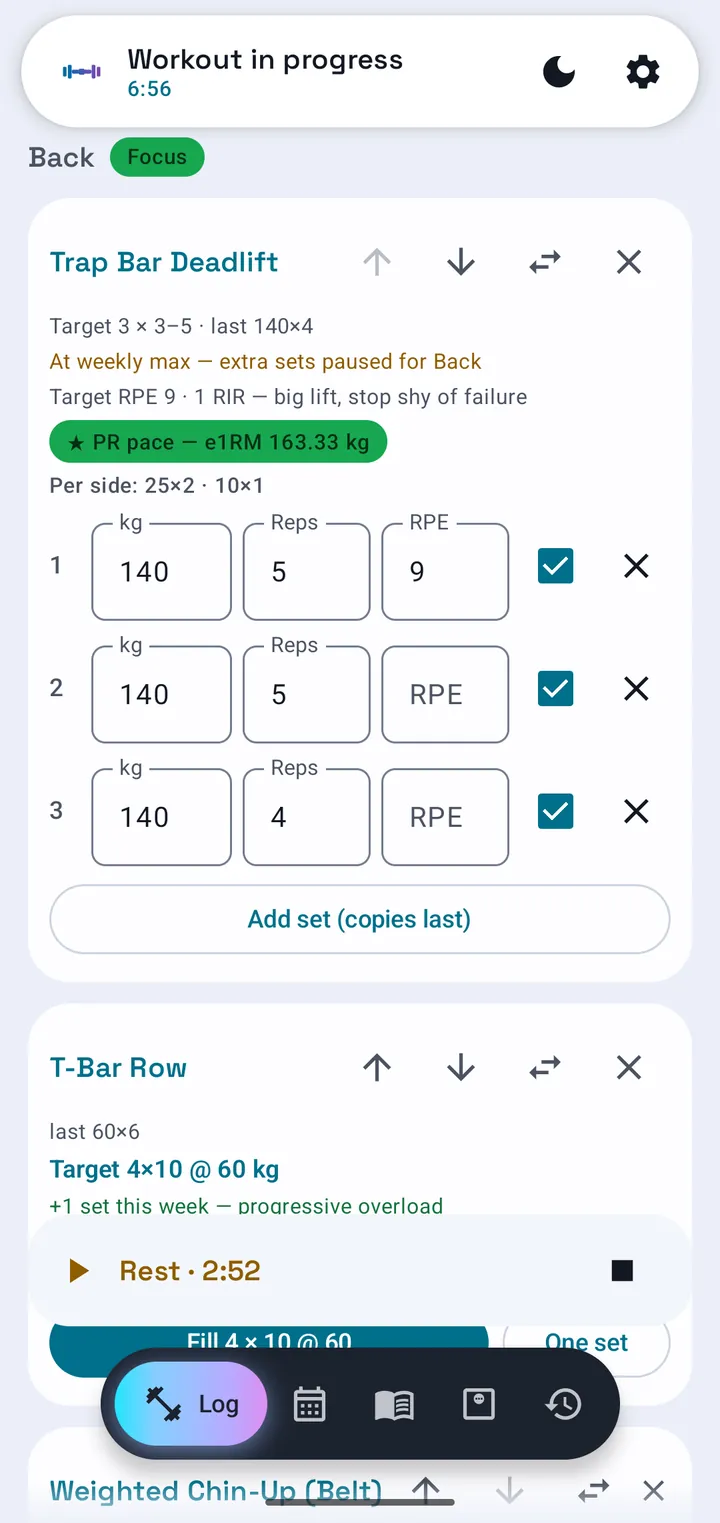
The Log tab mid-session: an exercise card showing the engine's target, plate-math chips and set rows, with the rest timer counting down.
299exercises built in, fully tagged
12muscle groups tracked separately
4permissions, total
0accounts, feeds or coaching tiers

The whole product in one loop

Log it. Finish it.
Let it decide.

Most trackers are a notebook that adds up. SoleGym reads what you did and commits to what comes next.

Type the set

Weight, reps, RPE. Tick it and the rest timer starts itself. Every keystroke is saved.

Finish the session

The engine runs once, on save, and reads the whole session lift by lift.

Read the verdict

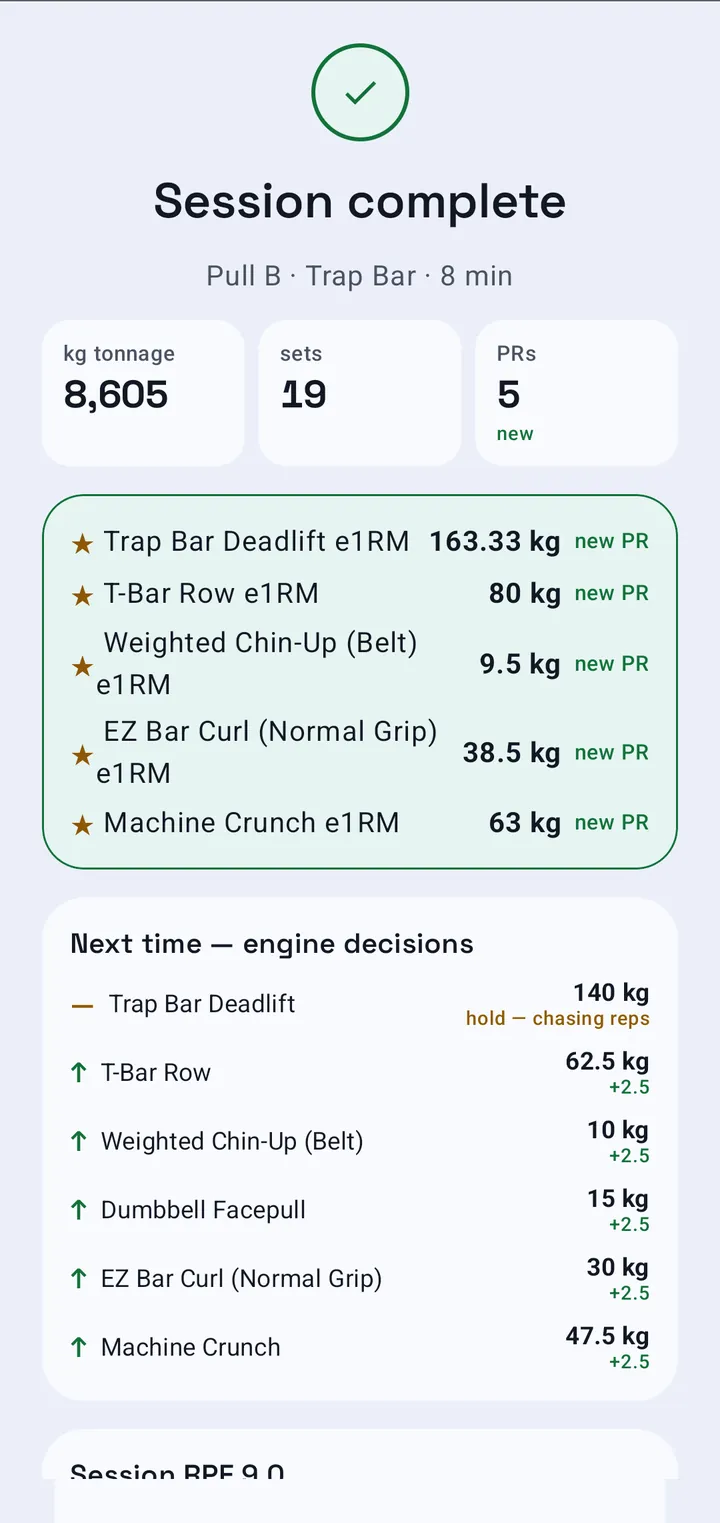
One row per lift: the new weight, a direction, and why. It's waiting on the card next time.

The session summary screen listing each lift's engine decision with a direction glyph, the new weight and the reason.

“Next time — engine decisions”

A decision per lift, with its reasoning:

  • Trap Bar Deadlift+2.5145 kg
  • T-Bar Rowhold — missed reps60 kg
  • Weighted Chin-Up (Belt)+2.515 kg
  • EZ Bar Curl (Normal Grip)+2.535 kg

A judgement per lift, not a number that creeps up because a week went by. Miss the reps and it holds. Miss twice and it drops 10% to rebuild.


Five tabs, no menus

Everything it does,
and where it lives.

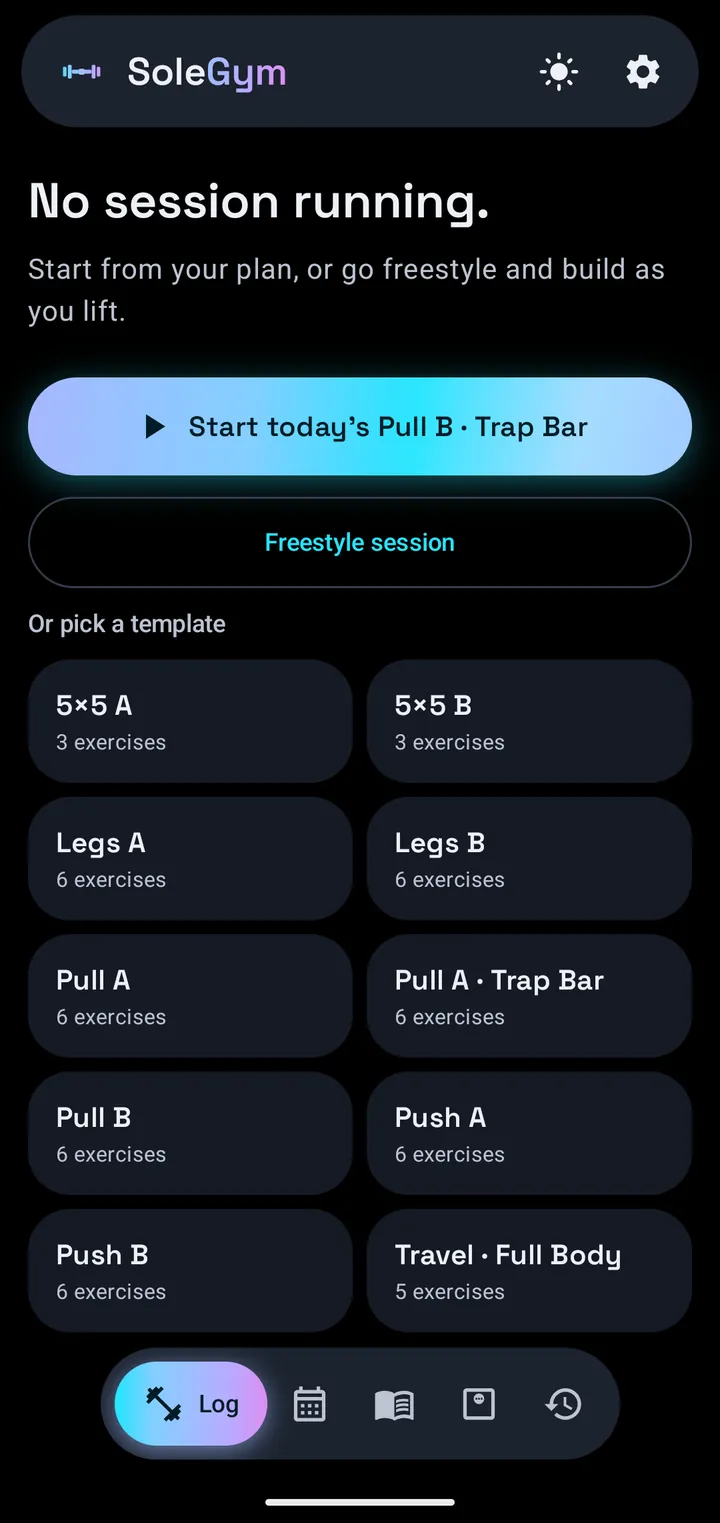
Log — the set, and the rest

  • The target is already there. Sets, reps and weight, carried over by the engine.
  • Rest that starts itself. Tick a set and that exercise’s countdown begins.
  • Plate math per side, so you’re not doing arithmetic between sets.

Plan — the block, and the week

  • A seven-day split you fill with your own templates.
  • Training blocks of 4–8 weeks that build your sets up, peak, then deload.
  • An honest read on the week’s volume — muscle by muscle.

Library — lifts and templates

  • 299 exercises ship tagged and ready. Add your own whenever.
  • Search and filter by muscle group or equipment.
  • Eight templates built in, and yours are edited in a full-screen editor.

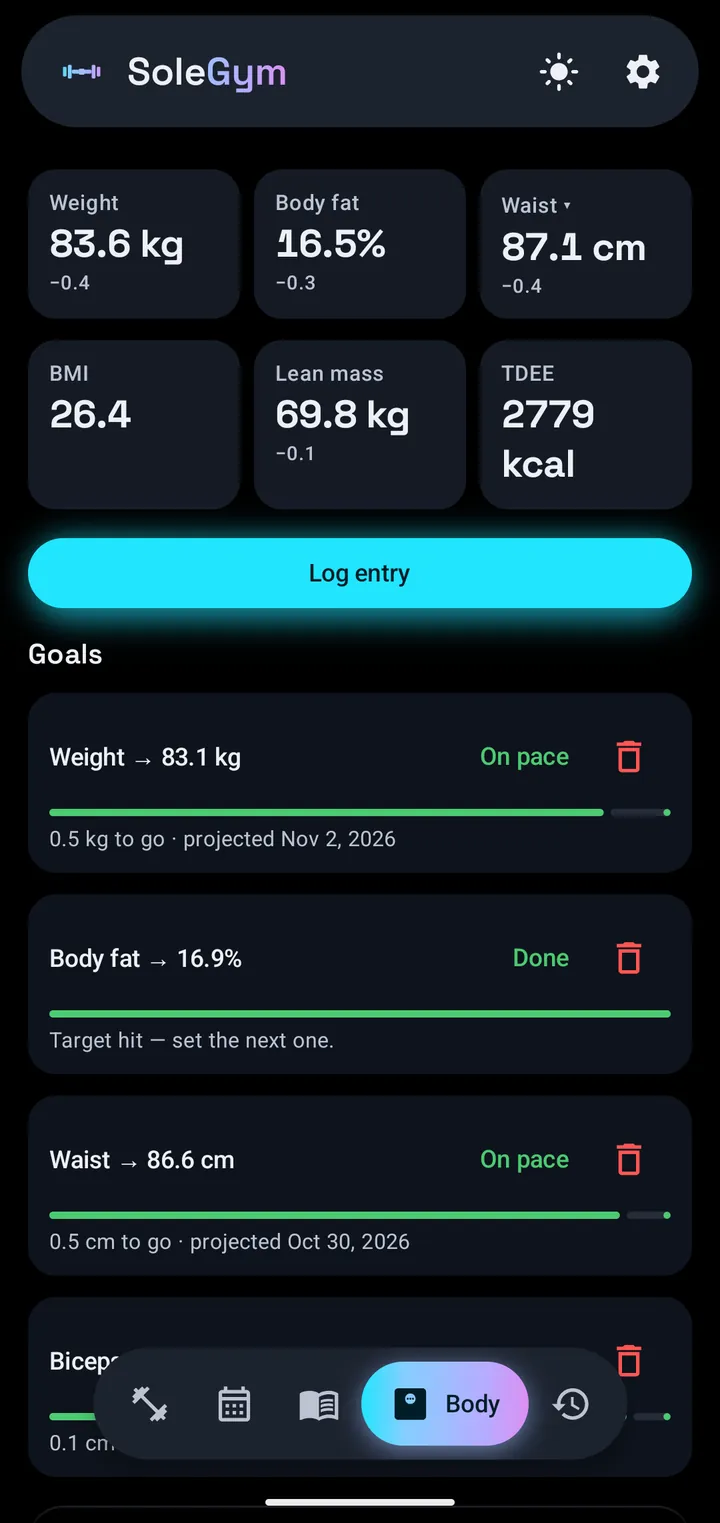
Body — measured, not guessed

  • Weight and eight tape sites become body fat, lean mass, BMI and TDEE.
  • Goals that pace themselves: on pace, behind, or done.
  • Correct your height today and every past figure recalculates.

History — what you actually did

  • Eight weeks of tonnage, and volume by muscle group.
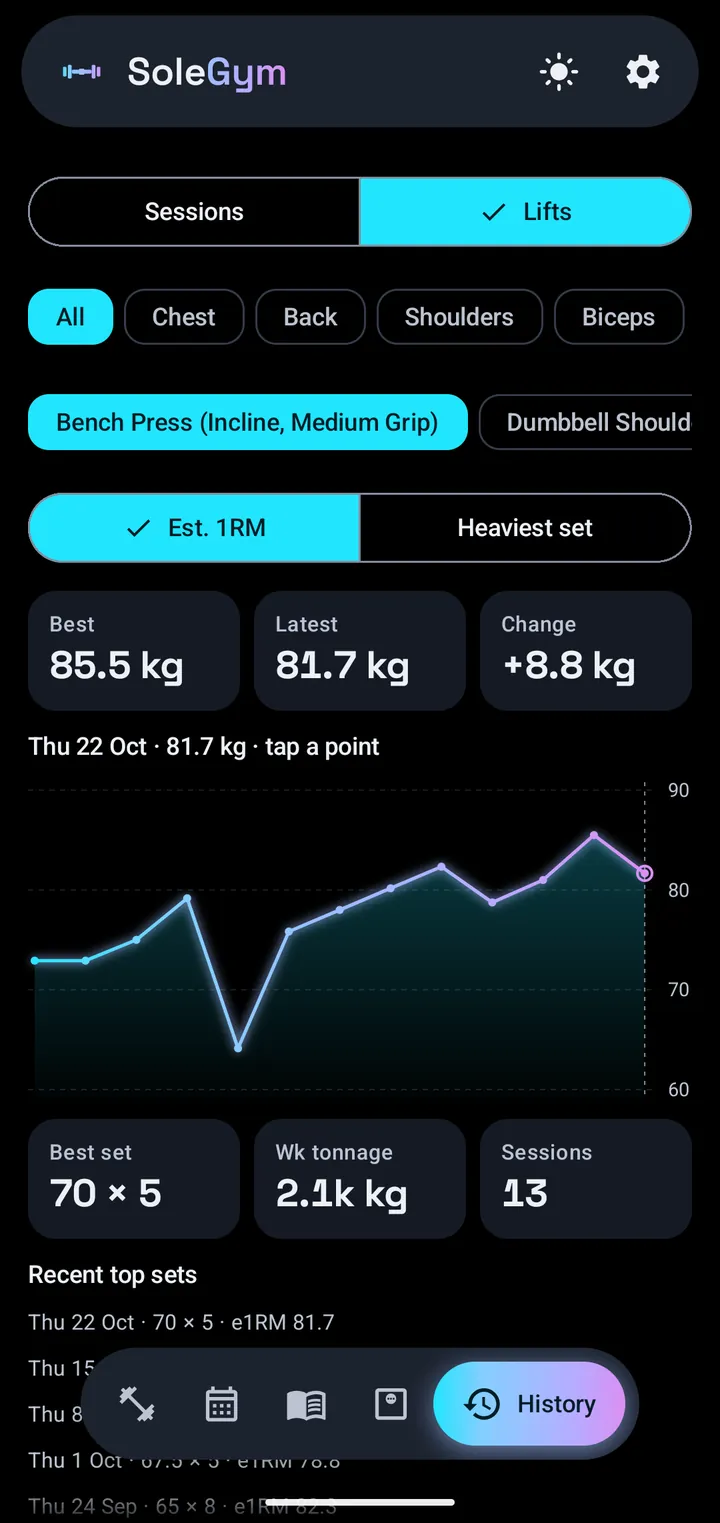
  • Per-lift trends — estimated 1RM or heaviest set.
  • Edit any past session. Volume and PRs recalculate on save.

The progression engine

Four ways to be told
to add weight.

Pick one per exercise, or set a default for everything.

RPE autoregulated

Your hardest set's RPE steers it. Ships as the default.

Double progression

Fill the rep range, then the weight goes up.

Linear

Add weight every clean session.

None

Engine off. Nothing changes on its own.

5 kg on lower-body barbell work, 2.5 kg on everything else — and every target it works out lands on a weight you can actually load.


Training blocks

The block adds
the sets for you.

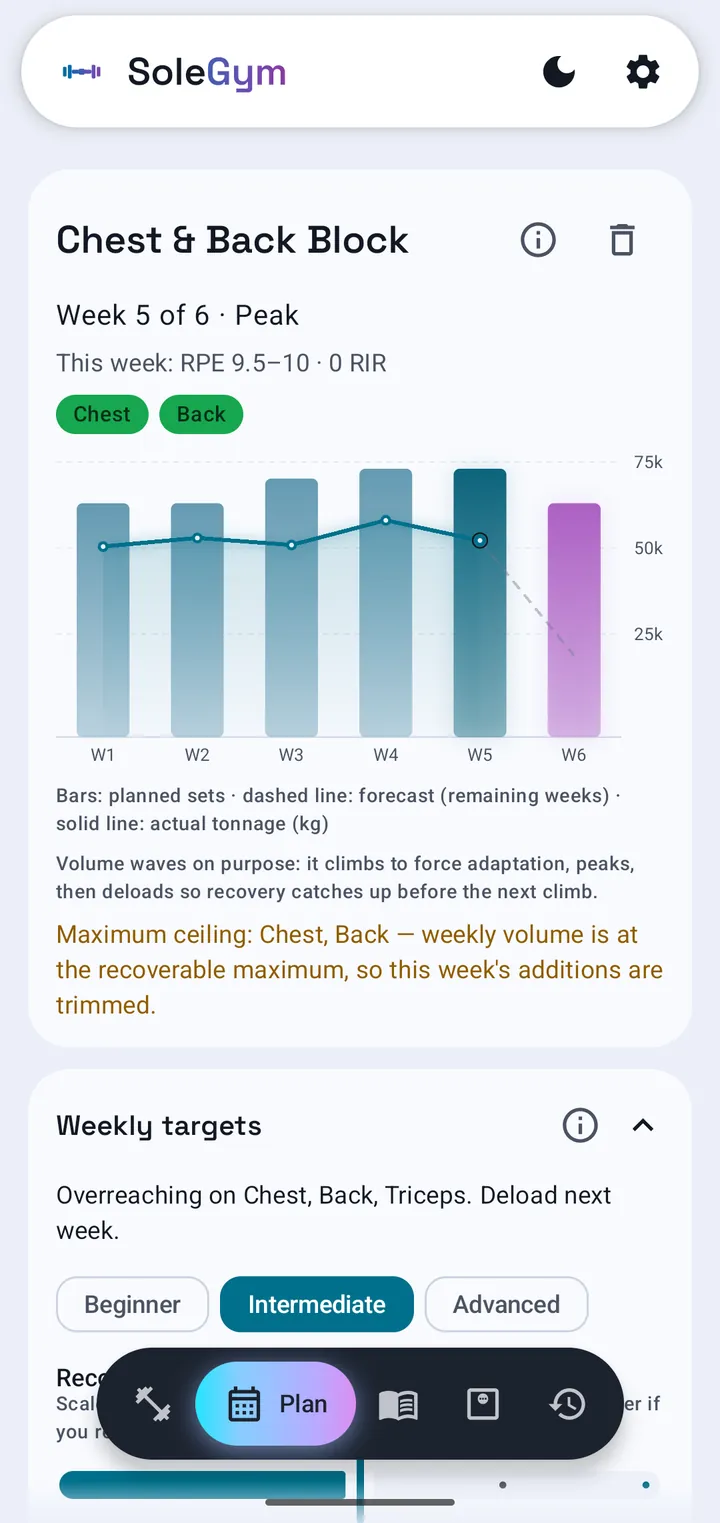
Pick a length and the muscles you're prioritising. Your sets climb week by week, peak, then drop for a deload. Every time.

  • It won't push you past your limit. Extra sets stop at the weekly maximum for that muscle.
  • Report a rough week and it holds the volume there instead of climbing.
  • Peak week doesn't mean failure on squats, bench or deadlifts — you're training alone.
The Plan tab showing a training block in week 5 of 6, with a chart of planned sets, actual tonnage and a forecast for the remaining weeks.

Weekly volume

Is this week worth
doing at all?

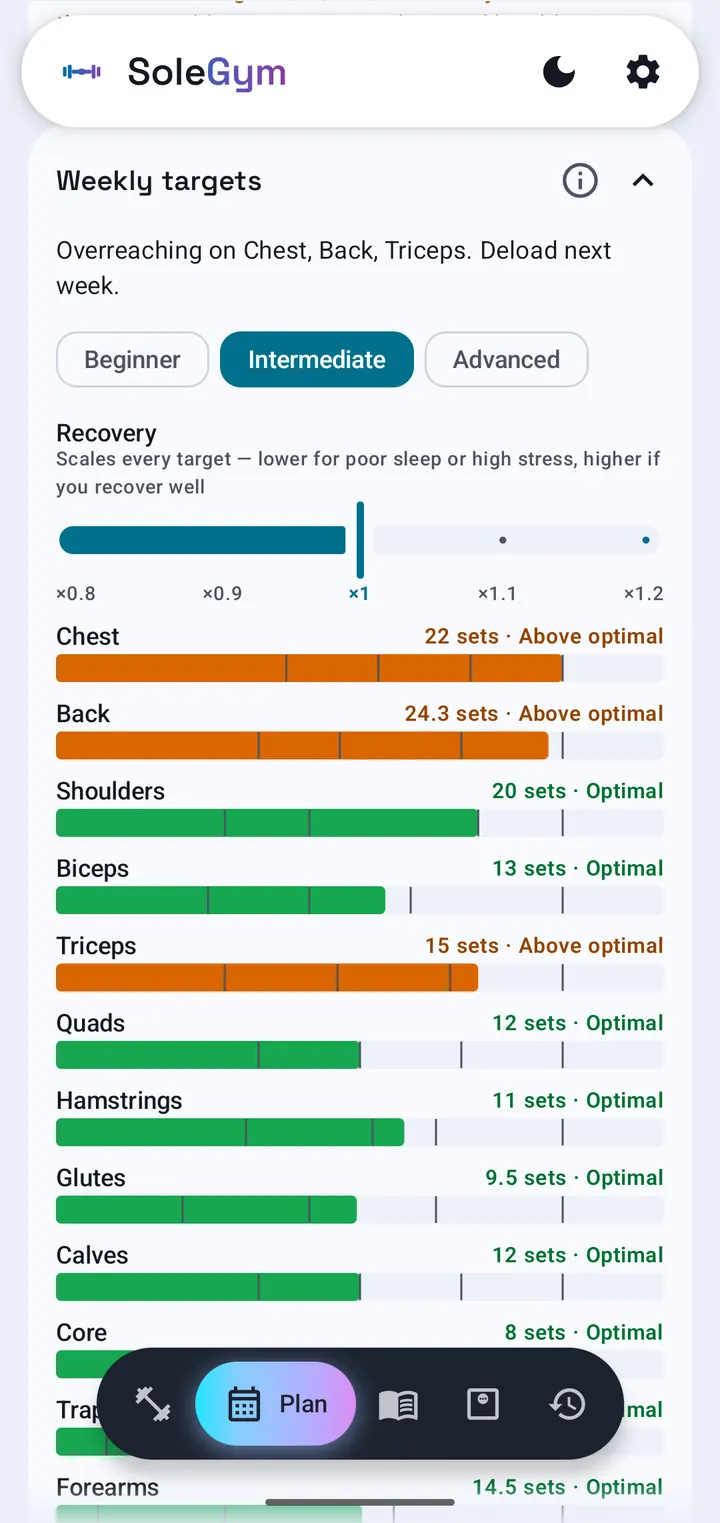
SoleGym reads the week you've planned and places all 12 muscle groups against how much work actually grows them.

Each muscle group's planned sets shown against the range that grows it, with a plain-language zone label.

Every row tells you what to do

Too little, about right, or too much — in words, not just a colour. “Add a set.” “Keep it here.” “Reduce sets or deload.”

Compounds count too

A bench press credits your triceps and front delts, a row credits biceps. A week with no direct glute work can still be well covered by squats and hinges.


Light or dark

It takes its colours
from your phone.

Or use SoleGym's own.

The Log tab in the light theme.
The Body tab in the light theme.
A per-lift trend chart in the light theme.

Yours alone

It can't reach
the internet.

Not "we don't sell your data" — the app simply has no way to send it. No account, no sync, no feed, no ads, no analytics. Your phone holds the only copy, and it moves only when you back it up.


Before you ask

Fair questions.

Do I have to set all this up?

No. Log a freestyle session and nothing else ever has to be configured — the engine still works. A weekly split, a deload, a full block: each one is optional on top.

Is there an iPhone version?

No — SoleGym is Android only, and needs Android 8.0 or newer.

Can I use pounds?

Yes. Switching units changes only what you read; nothing stored moves, and switching back loses nothing.

What if I change phones?

Export a backup and import it on the new phone. It's a single file you can keep anywhere.

Can I fix a session I logged wrong?

Yes — weights, reps and exercises are all editable afterwards, and everything recalculates. You can also exclude a session so it stays in your history but counts toward nothing.
The bar is loaded.

Start the log tonight. Six months from now you won't have to remember any of it.

Built by a lifter, for lifters who train alone.